

Miners Haven How To Make Money Fast
Contents
- 1 Overview
- 1.1 Public Servers
- 1.2 Solo Servers
- 1.3 VIP Servers
- 2 Parts of a Factory
- 2.1 Droppers
- 2.2 Conveyor
- 2.3 Upgraders
- 2.4 Furnace
- 3 Interface
- 3.1 Settings
- 3.2 Inventory
- 3.3 Shop
- 3.3.1 Beginner's Tips
- 4 Other features
- 4.1 Crates
- 4.2 Unobtanium Crystals
- 5 Ore Limit
Overview
Thank you for starting Miner's Haven! When it finishes loading assets, you see a few options: "Join Server" "Play Solo", or VIP servers. There are pros and cons to all of these.
Public Servers
More and better Research Crates fall from the sky and the merchant The Masked Man appears in these servers on weekends. Each server can hold up to 6 players.
Solo Servers
Less crates fall from the sky but you get to be on an island by yourself. Players won't bother you and these servers contain less lag because the server has one factory instead of six.
VIP Servers
Previously known as Private Islands, these are one-player servers that cost R$100. When purchasing one, you will be awarded a Pineapple Refiner and 100 Unobtainium Crystals (uC, read the section below).
Parts of a Factory
Once you join a server, you will fall onto a gray foundation which is your factory (commonly referred to as your base). This is where you place decorations, utilities, and items use to help you make money:
Droppers
These are machines that spit out ore every few seconds. Ore has a set amount of money (besides some special droppers) but can go higher based on what you do with it.
Conveyor
These are objects you place on your base that transport ore.
Upgraders
Upgraders are either machines with conveyors attached to them or tools that are attachable to the side of conveyors. Upgraders can add a sum of money to ore, increase ore value by a percentage, or multiply ore value. Some upgraders also set ore on fire or make it radioactive.
Furnace
Furnaces take ore and give you money based on how much they're worth. Furnaces can add a sum of money and/or multiply ore value.
Interface
Settings
This menu is where you type in codes for uC, Twitch coins, or mystery boxes. There's also a Rebirth button which you should worry about much much later into the game. There's also an option to withdraw all items which is used to put EVERYTHING on your base back into your inventory.
Inventory
If there aren't objects on your base, they're in your inventory and you can take them out to place on your factory. This is where items go when purchasing them from the shop.
Shop
The shop is where players get most of their items, especially for beginners. The shop is split up into sections based on what items are being sold.
Beginner's Tips
Start with some iron mines, conveyor belts, a basic furnace, some big torches, an Ore Purifier, and a Large Ore Upgrader. To get started, place down some conveyor belts and find the direction they are going in. Once found, place your ore upgraders and place going in the same direction as the conveyor belts. To start making money, place the furnace at the end of the line of machines. If you think, "Thank you, I am making a lot of money," there is still plenty of upgrading to do! To make more money, you need to buy a lot of higher quality upgraders and delete the furnace that ore fall in to replace it with a stronger one. Think about your setup as well - it can make all the difference. Continue this process until you have better mines and better everything.
Other features
Crates
In random intervals, crates will fall down from the sky. Collect them by touching them; you will get RP (research points) and, sometimes, a mystery box. You might even get an item.
Research points can be collected. The more you have, the more you can discover and/or view more things.
Unobtanium Crystals
Unobtanium Crystals are a secondary currency in Miner's Haven which is abbreviated to uC. You can use uC to get premium, refined, and even collectible items during an event. They're also used to buy Regular or Unreal boxes, changing the server or global radio, and shouting. uC can be found in small and purple crates, Daily Gifts, and can be purchased with robux. You can also follow Berezaa on twitter @Berezaagaming for secret codes to get uC.
Ore Limit

Ore Limit Bar
Ore Limit Setting

Ore Limit Bar
Ore Limit Setting
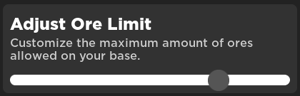
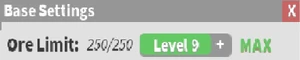
The Ore Limit is a meter that displays how many of your ores are on the map. There are no exceptions to the ore being counted toward the ore limit. Once your ore is full, no further ores will be produced by your droppers. The ore count can be instantly reset by using an Ore Pulsar or an Ore Quasar to destroy all ores. Some bugs do appear with the ore limit including the following:
- On extremely rare occasions, the ore limit might glitch out where the true limit is not what is visible in the menu.
Your ore limit start off with a limit of 75 ores you can increased this using the bar in the settings.
Miners Haven How To Make Money Fast
Source: https://minershaven.fandom.com/wiki/Category:Tutorial
Posted by: morrisgonstornes.blogspot.com
0 Response to "Miners Haven How To Make Money Fast"
Post a Comment